Agent Auth supports progressive authentication levels: pseudonymous, identified, and authorized. This document covers the identified level where agents prove a stable, verifiable identity backed by cryptographic, discoverable keys.
What is Identified Access?
With identified scheme, an agent proves it controls keys published at a well-known URL. The resource can verify that:
- The request was signed by the holder of a private key
- That private key corresponds to a public key published at the agent’s declared identity URL
- The agent’s identity is stable and verifiable across requests
Unlike pseudonymous (HWK) access, the agent does prove who they are. Their identity is bound to a domain they control (HTTPS). This enables policy decisions based on known agent identities and audit trails tied to specific agents.
This approach forms the foundation for Agent Identity.
The JSON Web Key Set (JWKS) scheme requires agents to publish their public keys at a discoverable URL. Instead of embedding the key inline, the agent tells the resource where to fetch it.
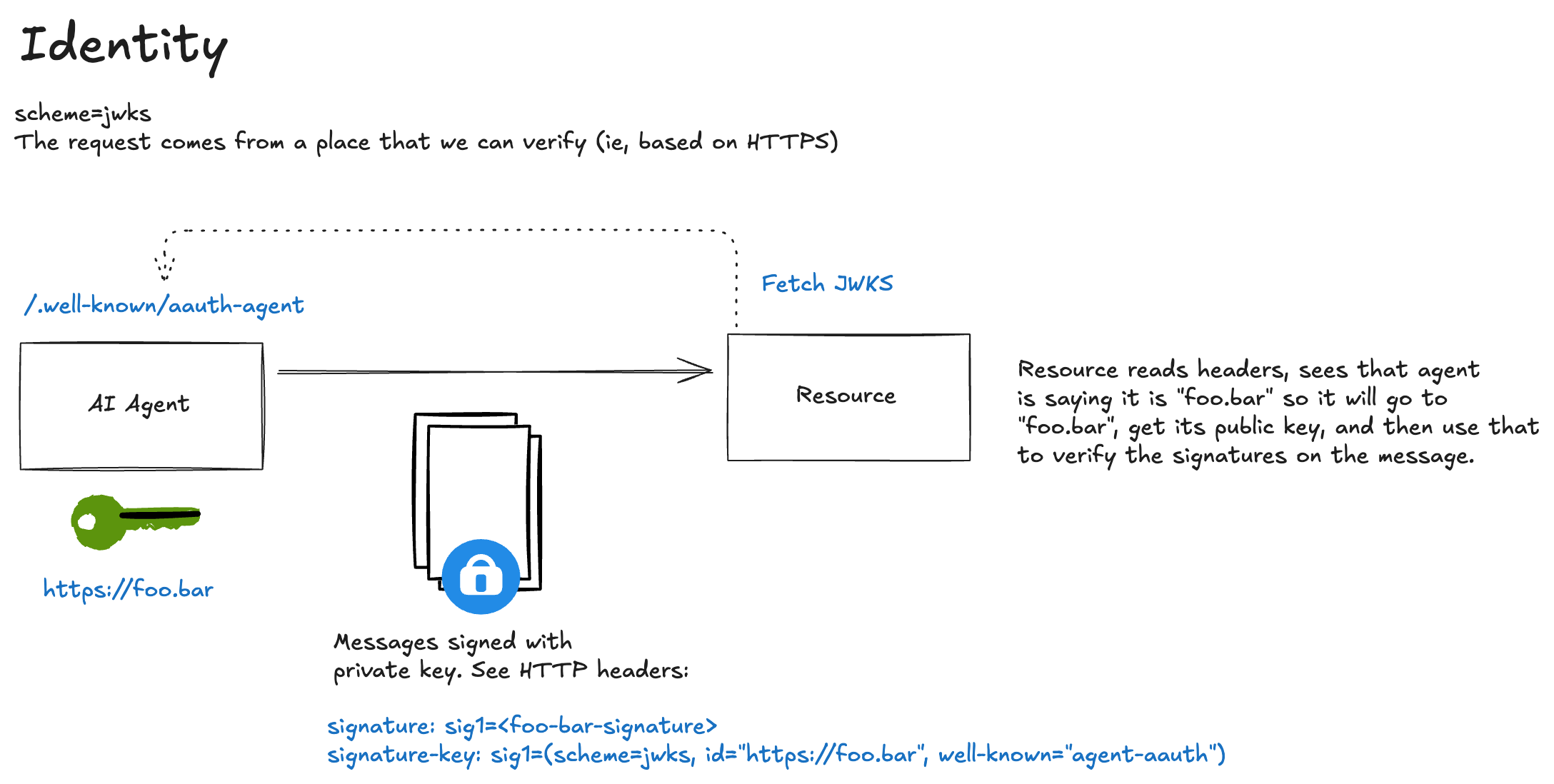
Key ownership:
- The agent generates and holds the private key locally
- The agent publishes the public key at a JWKS endpoint (e.g.,
https://agent.supply-chain.com/jwks.json) - The agent hosts metadata at a well-known endpoint declaring their JWKS location
- The resource fetches (and potentially caches) these keys for verification
What the resource can verify:
- The request was signed by someone holding the corresponding private key
- That key is published by the declared agent identity
- The covered components haven’t been tampered with
- The signature was created recently (via the
createdtimestamp)
What the resource can also establish:
- Who the signer is (the agent identity URL)
- The agent controls the domain where keys are published
- Organizational trust based on domain reputation
In the current demo, the resource exposes two endpoints independently: /data-hwk still accepts the pseudonymous HWK flow from phase 1, while /data-jwks requires identified access. When the agent calls the JWKS-protected endpoint, it sends:
================================================================================
>>> AGENT REQUEST to https://important.resource.com/data-jwks
================================================================================
GET https://important.resource.com/data-jwks HTTP/1.1
Signature: sig=:PeOsuu6w8egvbZ6rZGd0zYCLAkbUsFjYDGB8OTzX_LT_xc3jVl2ko4mFdluttWukieniGIa7kBDK37wgCj7kBw:
Signature-Input: sig=("@method" "@authority" "@path" "signature-key");created=1774921760
Signature-Key: sig=(scheme=jwks_uri id="https://agent.supply-chain.com" kid="key-1")
================================================================================
Understanding the Request Headers
Resource sees:
================================================================================
>>> RESOURCE REQUEST received
================================================================================
GET /data-jwks HTTP/1.1
Host: important.resource.com
accept: */*
accept-encoding: gzip, deflate
connection: keep-alive
host: important.resource.com
signature: sig=:PeOsuu6w8egvbZ6rZGd0zYCLAkbUsFjYDGB8OTzX_LT_xc3jVl2ko4mFdluttWukieniGIa7kBDK37wgCj7kBw:
signature-input: sig=("@method" "@authority" "@path" "signature-key");created=1774921760
signature-key: sig=(scheme=jwks_uri id="https://agent.supply-chain.com" kid="key-1")
user-agent: python-httpx/0.28.1
================================================================================
Signature-Input
Signature-Input: sig=("@method" "@authority" "@path" "signature-key");created=1774921760
This header declares what was signed and how:
| Component | Meaning |
|---|---|
sig= |
The signature label, must match across all three headers |
"@method" |
The HTTP method (GET) is covered by the signature |
"@authority" |
The host (important.resource.com) is covered |
"@path" |
The path (/data-jwks) is covered |
"signature-key" |
Critical: The Signature-Key header itself is covered, preventing identity substitution attacks |
created=1774921760 |
Unix timestamp when the signature was created (resources typically reject signatures older than 60 seconds) |
Signature
Signature: sig=:PeOsuu6w8egvbZ6rZGd0zYCLAkbUsFjYDGB8OTzX_LT_xc3jVl2ko4mFdluttWukieniGIa7kBDK37wgCj7kBw:
The actual cryptographic signature, base64-encoded between colons (RFC 9421 format).
Signature-Key
Signature-Key: sig=(scheme=jwks_uri id="https://agent.supply-chain.com" kid="key-1")
| Parameter | Meaning |
|---|---|
sig= |
Must match the label in Signature-Input and Signature |
scheme=jwks_uri |
JWKS-based identity scheme using discoverable metadata and a JWKS document |
id="https://agent.supply-chain.com" |
The agent’s identity URL (base for key discovery) |
kid="key-1" |
Key ID to look up in the JWKS |
Note: The id parameter establishes the agent’s identity claim. The resource will verify this claim by fetching keys from that domain.
If the agent uses the wrong signature scheme on this endpoint, the resource responds with AAuth: require=identity to tell the agent it needs identified access rather than a pseudonymous HWK signature. We show that rejection later in this flow.
Key Discovery Process
Before verifying the signature, the resource must fetch the agent’s public key. This involves two HTTP requests:
Step 1: Fetch Agent Metadata
The resource constructs the metadata URL from the id parameter:
https://agent.supply-chain.com/.well-known/aauth-agent.json
INFO: 127.0.0.1:64592 - "GET /.well-known/aauth-agent.json HTTP/1.1" 200 OK
Response:
{
  "agent": "https://agent.supply-chain.com",
  "jwks_uri": "https://agent.supply-chain.com/jwks.json",
  "clarification_supported": true
}
The metadata document:
- Confirms the agent identity (
agentfield matches theidparameter) - Points to the JWKS endpoint (
jwks_uri)
Step 2: Fetch JWKS
The resource fetches the JWKS from the declared jwks_uri:
INFO: 127.0.0.1:64593 - "GET /jwks.json HTTP/1.1" 200 OK
Response:
{
  "keys": [
    {
      "kty": "OKP",
      "crv": "Ed25519",
      "x": "6-vu8FSaXUKtJjPYyiHIg1AILKIMI_ohgjvJsYZzaEk",
      "kid": "key-1"
    }
  ]
}
The resource looks up the key matching kid="key-1" from the request’s Signature-Key header.
Caching: Resources should cache JWKS responses (respecting HTTP cache headers) to avoid fetching on every request. Key rotation is handled by publishing new keys with different kid values.
Resource Verification Process
When the resource receives this request, it performs these steps:
1. Signature-Key Coverage Check
The resource confirms that "signature-key" is listed in the covered components. This prevents identity substitution attacks where an attacker could:
- Intercept a legitimately-signed request
- Replace the
Signature-Keyheader with their own identity - Claim the request was made by their agent
2. Signature Base Reconstruction
The resource reconstructs the exact bytes that were signed:
"@method": GET
"@authority": important.resource.com
"@path": /data-jwks
"signature-key": sig=(scheme=jwks_uri id="https://agent.supply-chain.com" kid="key-1")
"@signature-params": ("@method" "@authority" "@path" "signature-key");created=1774921760
3. Signature Verification
Using the discovered public key, verify the signature over the reconstructed signature base.
4. Apply Policy
With a verified identity, the resource can make richer access decisions:
- Check if this agent is on an allowlist
- Grant access tiers based on agent reputation
- Log requests with verified attribution
In our example, if the resource determines this is a valid request and agent identity, it can proceed with the request and return an HTTP 200.
================================================================================
<<< RESOURCE RESPONSE
================================================================================
HTTP/1.1 200
content-length: 130
content-type: application/json

[Body (130 bytes)]
{"message":"Access granted","data":"This is protected data","scheme":"jwks_uri","method":"GET","agent_id":"https://agent.supply-chain.com"}
================================================================================
Notice the response now includes agent_id. The resource knows exactly which agent made the request.
Agent gets response
================================================================================
<<< AGENT RESPONSE from https://important.resource.com/data-jwks
================================================================================
HTTP/1.1 200 OK
content-length: 130
content-type: application/json
date: Tue, 31 Mar 2026 01:49:19 GMT
server: uvicorn

[Body (130 bytes)]
{"message":"Access granted","data":"This is protected data","scheme":"jwks_uri","method":"GET","agent_id":"https://agent.supply-chain.com"}
================================================================================
If identity is not included in the request, the resource rejects and propmts for the right auth with the aauth header:
================================================================================
<<< AGENT RESPONSE from https://important.resource.com/data-jwks
================================================================================
HTTP/1.1 401 Unauthorized
aauth: require=identity
content-length: 52
date: Tue, 31 Mar 2026 01:49:34 GMT
server: uvicorn

[Body (52 bytes)]
Invalid signature scheme: expected jwks_uri, got hwk
================================================================================
That AAuth: require=identity challenge tells the agent this endpoint needs a verifiable agent identity, not just an inline pseudonymous key.
HWK vs JWKS: When to Use Each
| Aspect | HWK (Pseudonymous) | JWKS (Identified) |
|---|---|---|
| Identity | None—just a public key | Domain-bound identity URL |
| Key discovery | Inline in request | Fetched from agent metadata and JWKS |
| Infrastructure | None required | Must host well-known + JWKS endpoints |
| Trust model | Track by key fingerprint | Trust by domain reputation |
| Use cases | Crawlers, testing, privacy | Production agents, enterprise, APIs |
| Auth Upgrade path | Can upgrade to JWKS later | Can upgrade to authorized access |
Where to Next
In this flow, we reviewed the identified access pattern with AAuth’s JWKS scheme. Agents can now prove their identity cryptographically but they’re still accessing resources without explicit authorization.
For scenarios requiring explicit permission grants (OAuth-style token flows), we explore the authorized tier in the next section: flow-03-tokens.md.