
If you’re building AI agents that need strong identity, proper authorization, and the ability to act on behalf of users, Microsoft’s Entra Agent ID capability is worth your attention. I’ve put together a 5-part series that takes you from “what is this?” to a fully working AI agent deployment on Kubernetes, complete with LLM and MCP server integration.
Here’s what you’ll get from each part.
Part One: Understanding Entra Agent ID
This part lays the conceptual foundation. You’ll learn how Entra Agent ID builds on existing Entra constructs: users, service principals, app registrations—and extends them to support AI agents as first-class citizens.
The key concept here is the Agent Identity Blueprint: a template that defines how agents are created and what permissions they inherit. Think of it as a factory that can spawn agent identities on demand. Each agent gets its own unique identity (a real service principal in Entra) while inheriting configuration from its parent blueprint.
By the end, you’ll understand the token structure that makes agent identity work including the xms_act_fct and xms_sub_fct claims that tell downstream services “this is an AI agent” versus “this is an AI agent acting on behalf of a user.”
Part Two: Agent On-Behalf-Of User
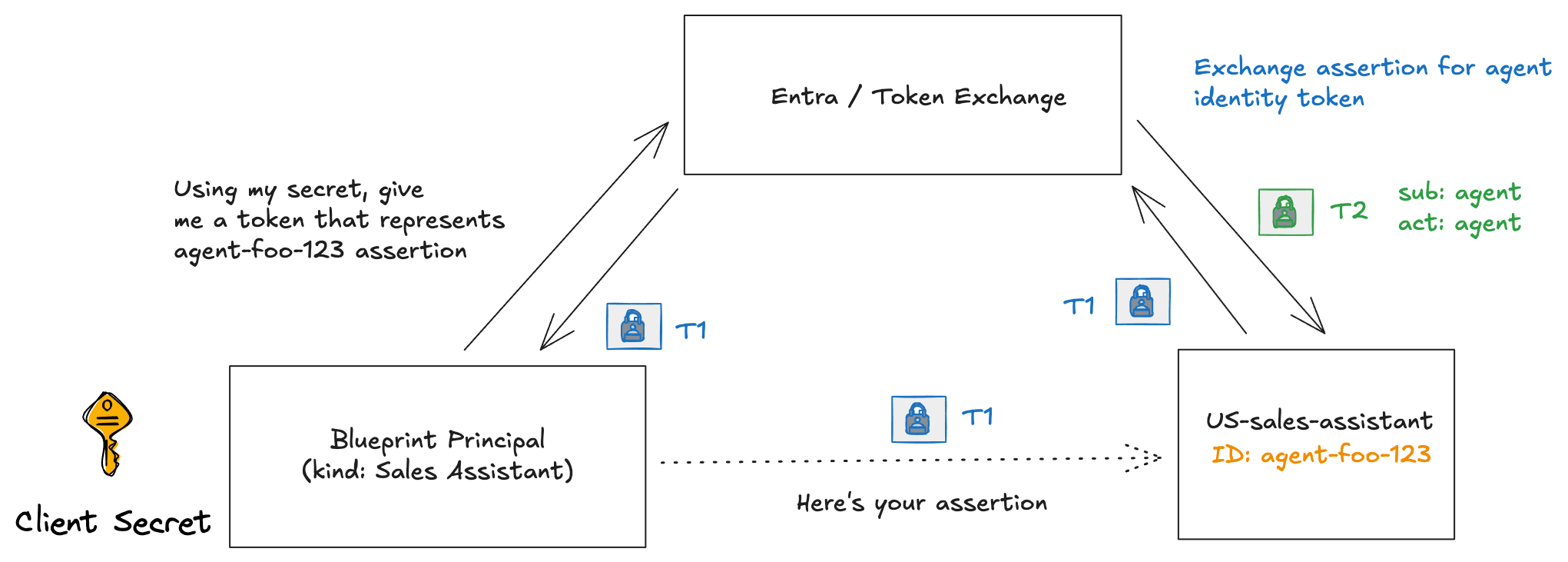
This part digs into the token exchange mechanics. When your agent needs to call an API on behalf of a user (not just as itself), there’s a specific flow: the T1/T2 token exchange.
You’ll see the actual token payloads and understand what each claim means. The difference between an agent acting as itself (idtyp: app) versus on behalf of a user (idtyp: user) becomes clear when you examine the tokens side-by-side.
This matters because downstream services can now enforce agent-specific policies while still knowing which user authorized the action which is critical for audit trails and compliance.
Part Three: Running on Kubernetes
This part introduces the Microsoft Entra SDK sidecar—a container that handles all the token exchange complexity so your application doesn’t have to.
The sidecar exposes simple HTTP endpoints on localhost:
/AuthorizationHeader/{apiName}— get a token for OBO flows/AuthorizationHeaderUnauthenticated/{apiName}— get a token as the agent itself/DownstreamApi/{apiName}— proxy calls with automatic token injection
You’ll deploy your first agent workload to Kubernetes with the sidecar pattern. Fair warning: this version uses client secrets, which isn’t production ready but it gets you running.
Part Four: Workload Identity Federation
Now we fix the credential problem. Client secrets have no place in production, and this part shows how to eliminate them using Workload Identity Federation.
The idea: your Kubernetes service account token becomes the credential. Entra trusts tokens signed by your cluster’s OIDC issuer, so the sidecar can authenticate without any secrets in your deployment manifests.
The guide walks through Kind cluster configuration to keep things cloud-agnostic, but the pattern applies to AKS, EKS, or GKE. By the end, your agent workloads authenticate to Entra using nothing but their Kubernetes identity.
Part Five: LLM and MCP with Entra Agent ID and AgentGateway
A complete working example. You’ll deploy an AI agent that:
- Authenticates users via device code flow
- Connects to Azure OpenAI using OBO agent tokens (not API keys)
- Calls MCP servers on behalf of users
- Routes all traffic through AgentGateway for policy enforcement and observability
The example answers questions that naturally arise from the earlier parts: How do you map blueprints to pods? How do agent identities get created? How does the LLM get credentials?
All the moving pieces come together: workload identity federation, the SDK sidecar, OBO flows, and an actual AI agent doing useful work while maintaining proper identity and authorization throughout.
Who Should Read This
If you’re responsible for deploying AI agents in an enterprise environment and need to answer questions like “which agent did this?” and “who authorized it?”—this series gives you a concrete implementation path.
The code is available at github.com/christian-posta/entra-agent-id-agw, and the full documentation lives at blog.christianposta.com/entra-agent-id-agw.
For updates on agent identity and related topics, follow me on LinkedIn.