Agent Authorization (Autonomous)
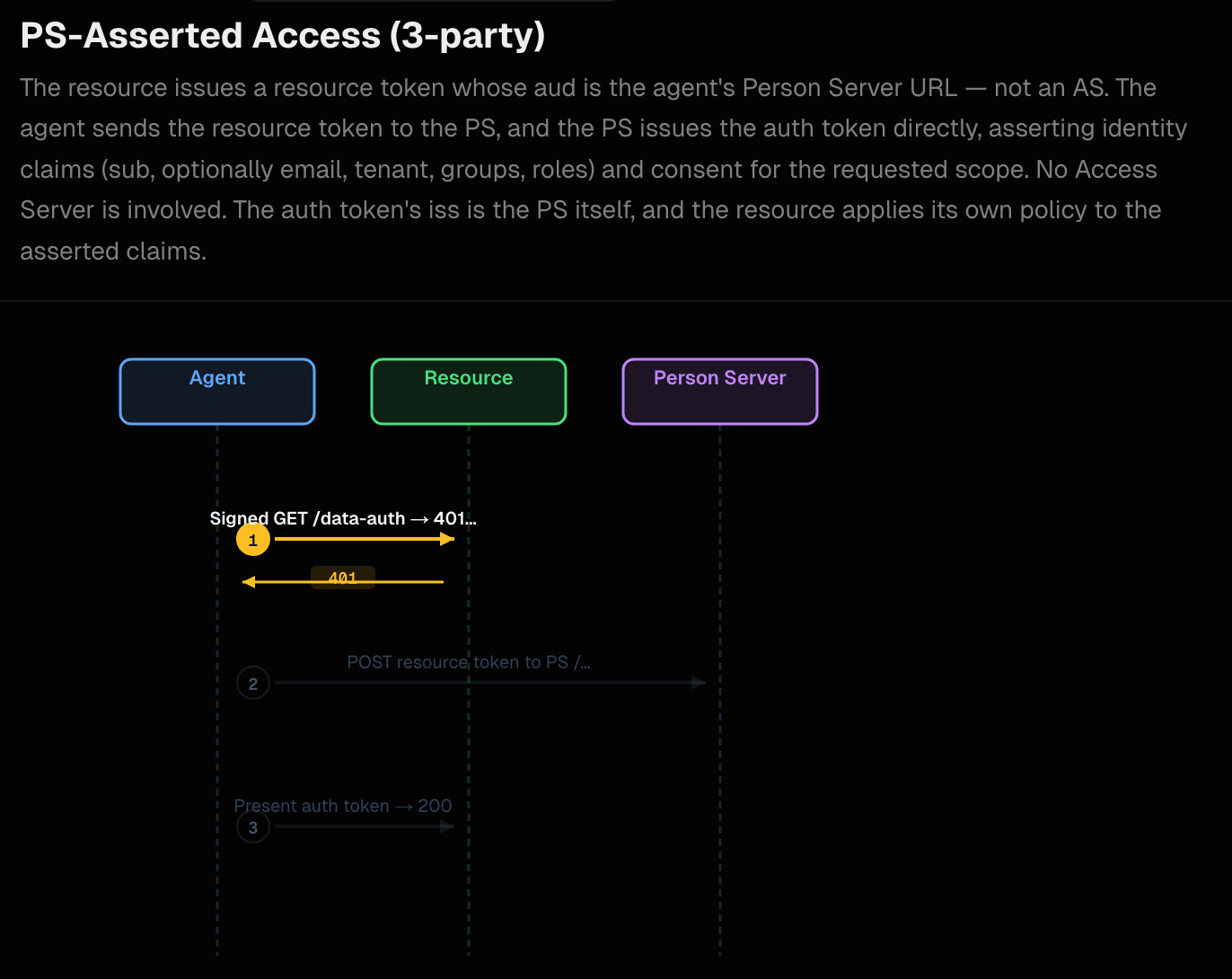
In this demo, we build on the agent identity we configured in the previous step and dig into a resource flow where the API rejects a call with the need for authorization. Resource access in this flow requires the resource to issue a 401 challenge + resource token when an agent presents only its aa-agent+jwt. The agent extracts the aa-resource+jwt from the AAuth response header, exchanges it at the Person Server for an aa-auth+jwt auth token, then retries the request. This is the PS-Managed (3-Party) flow in the AAuth spec.
Run the components
To run this demo, please set up the prerequisites
The Two Differences We will restart agentgateway and the aauth-extauth service for this demo. When restarting the AAuth extauthz service, run it with the aauth-config-mode3.yaml instead of the default aauth-config.yaml which we originally started with.
cd aauth-full-demo/agentgateway
AAUTH_CONFIG=aauth-config-mode3.yaml "$HOME/bin/extauth-aauth-resource/aauth-service"
When restarting agentgateway, restart with config-policy.yaml:
agentgateway -f ./agentgateway/config-policy.yaml
The aauth-config-mode3.yaml configuration specifies how the resource token will be created. It builds on the simple identity config from the previous/default, and adds these settings:
supported_scopes:
  - supply-chain:check
  - supply-chain:read
  - supply-chain:optimize
scope_descriptions:
  supply-chain:check: Check supply chain
  supply-chain:read: Read supply chain
  supply-chain:optimize: Optimize supply chain
default_resource_token_scopes:
  - supply-chain:check
  - supply-chain:read
access:
  require: auth-token
person_server:
  issuer: http://127.0.0.1:8765
  jwks_uri: http://127.0.0.1:8765/.well-known/jwks.json

allowed_signature_key_schemes:
  - jwt
allowed_jwt_types:
  - aa-agent+jwt
  - aa-auth+jwt
policy:
  name: default
You can see, for this particular resource, it will issue resource tokens with these specific scopes and require that a valid auth token (aa-auth+jwt) attached to the request.
If you don’t have the other services running from the previous step, you can start each one:
| Component | Port | Command |
|---|---|---|
| UI | 3050 | cd supply-chain-ui && npm start |
| Backend | 8000 | cd backend && uv run . |
| Supply-chain-agent | 9999 | cd supply-chain-agent && uv run . |
| Market-analysis-agent | 9998 | cd market-analysis-agent && uv run . |
Walking through the Demo Flow
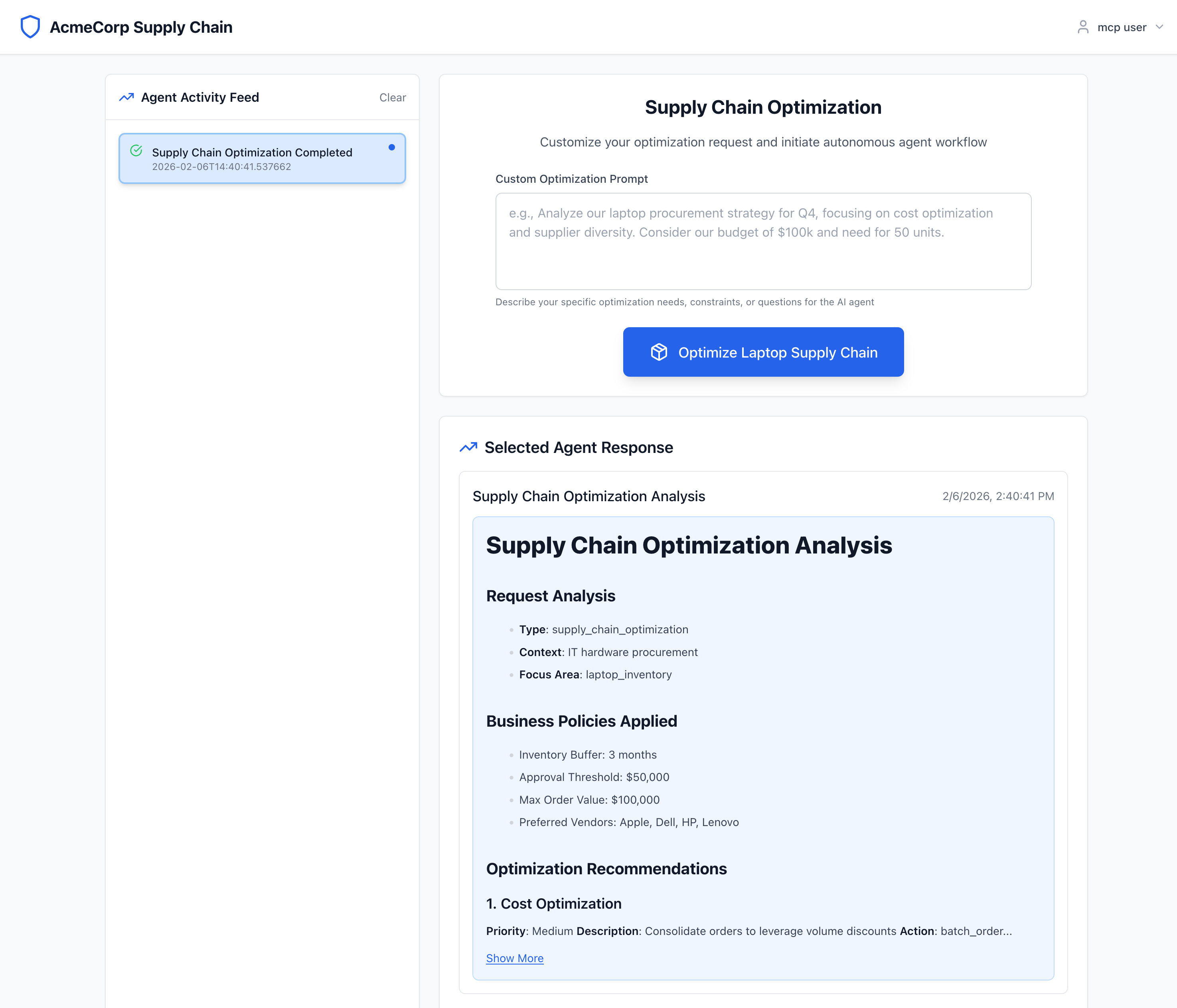
From the main UI page, if you click the "Optimize Laptop Supply Chain" button, it should kick off the flow for the backend components.
When backend calls supply-chain-agent, it receives a 401 and an AAuth response header carrying the resource token. The resource token binds the requested scopes to the calling agent (backend). Backend logs:
INFO:aauth.tokens:401 from supply-chain-agent: configure policy on agentgateway or fix signatures (Client error '401 Unauthorized' for url 'http://supply-chain-agent.localhost:3000'
For more information check: https://developer.mozilla.org/en-US/docs/Web/HTTP/Status/401)
WARNING:app.services.a2a_service:A2A supply-chain HTTP 401 (agentgateway or signing): Client error '401 Unauthorized' for url 'http://supply-chain-agent.localhost:3000'
For more information check: https://developer.mozilla.org/en-US/docs/Web/HTTP/Status/401
INFO:aauth.tokens:401 AAuth / aauth | aauth-requirement: requirement=auth-token, resource-token="eyJ0eXAiOiJhYS1yZXNvdXJjZStqd3QiLCJhbGciOiJFZERTQSIsImtpZCI6InNwYS1yc2stMSJ9.eyJpc3MiOiJodHRwOi8vc3VwcGx5LWNoYWluLWFnZW50LmxvY2FsaG9zdDozMDAwIiwiZHdrIjoiYWF1dGgtcmVzb3VyY2UuanNvbiIsImF1ZCI6Imh0dHA6Ly8xMjcuMC4wLjE6ODc2NSIsImFnZW50IjoiYWF1dGg6YjhlZjE1ZjktNzI1YS00ZTg3LWEwZGEtMTRhOGVkY2Y5MDA5QGFnZW50LXNlcnZlci5leGFtcGxlIiwiYWdlbnRfamt0IjoiazdQbE0yWmFGTnZtN3BfMk5QcVpwVzNEQ21nUkhxWWZCM3ppOVdKcGRibyIsImlhdCI6MTc3ODcxODMyMiwiZXhwIjoxNzc4NzE4NjIyLCJzY29wZSI6InN1cHBseS1jaGFpbjpjaGVjayBzdXBwbHktY2hhaW46cmVhZCIsImp0aSI6IjM1MWYxZWE4LWQ4MjgtNDhkOC1iNTUxLTQ0M2MyZjY3YzE3NCJ9.Q6vCpcnUQLgyPLfi1GV6Vnyyxm_G9w3H56gHkgDSBEXK5Cn6ybJJE4RzndRIZrQiJQZpH_Z2nBQNaDFjXAR9CA"
INFO:app.services.a2a_service:401 AAuth challenge header | aauth-requirement: requirement=auth-token, resource-token="eyJ0eXAiOiJhYS1yZXNvdXJjZStqd3QiLCJhbGciOiJFZERTQSIsImtpZCI6InNwYS1yc2stMSJ9.eyJpc3MiOiJodHRwOi8vc3VwcGx5LWNoYWluLWFnZW50LmxvY2FsaG9zdDozMDAwIiwiZHdrIjoiYWF1dGgtcmVzb3VyY2UuanNvbiIsImF1ZCI6Imh0dHA6Ly8xMjcuMC4wLjE6ODc2NSIsImFnZW50IjoiYWF1dGg6YjhlZjE1ZjktNzI1YS00ZTg3LWEwZGEtMTRhOGVkY2Y5MDA5QGFnZW50LXNlcnZlci5leGFtcGxlIiwiYWdlbnRfamt0IjoiazdQbE0yWmFGTnZtN3BfMk5QcVpwVzNEQ21nUkhxWWZCM3ppOVdKcGRibyIsImlhdCI6MTc3ODcxODMyMiwiZXhwIjoxNzc4NzE4NjIyLCJzY29wZSI6InN1cHBseS1jaGFpbjpjaGVjayBzdXBwbHktY2hhaW46cmVhZCIsImp0aSI6IjM1MWYxZWE4LWQ4MjgtNDhkOC1iNTUxLTQ0M2MyZjY3YzE3NCJ9.Q6vCpcnUQLgyPLfi1GV6Vnyyxm_G9w3H56gHkgDSBEXK5Cn6ybJJE4RzndRIZrQiJQZpH_Z2nBQNaDFjXAR9CA"
Here we can see that we got a 401 when backend tried to call supply-chain-agent and it also returned an aauth-requirement header with requirement=auth-token and a resource token. This resource token binds a request for scopes to call this supply-chain-agent to the backend caller. The auth-server in the response is the Person Server (http://127.0.0.1:8765), which is also the AAuth Agent Provider that issued the agents’ aa-agent+jwt tokens. If we decode the JWT resource token it looks like this:
{
  "iss": "http://supply-chain-agent.localhost:3000",
  "dwk": "aauth-resource.json",
  "aud": "http://127.0.0.1:8765",
  "agent": "aauth:b8ef15f9-725a-4e87-a0da-14a8edcf9009@agent-server.example",
  "agent_jkt": "k7PlM2ZaFNvm7p_2NPqZpW3DCmgRHqYfB3zi9WJpdbo",
  "iat": 1778718322,
  "exp": 1778718622,
  "scope": "supply-chain:check supply-chain:read",
  "jti": "351f1ea8-d828-48d8-b551-443c2f67c174"
}
This token proves that backend was trying to call supply-chain-agent with the listed scopes. The aud is the Person Server (http://127.0.0.1:8765) — the same entity that issued the agents’ aa-agent+jwt tokens and that will exchange this resource token for an aa-auth+jwt.
The extuathz aauth-service at the gateway side (on behalf of supply-chain-agent) verified the incoming request by:
- Decoding the
aa-agent+jwtfrom theSignature-Keyheader - Fetching the AAuth Agent Provider JWKS at
{iss}/.well-known/aauth-agent.jsonto verify the JWT signature - Verifying
cnf.jwkmatches the key that signed the HTTP request (proof-of-possession) - Finding that
access: require: auth-tokenis configured — issuing a 401 resource-token challenge
Further in the logs, you can see the extauthz aauth-service creates a challenge and responds with HTTP 401:
{"time":"2026-05-14T00:25:22.986237Z","resource_id":"supply-chain-agent","level":"identified","agent_server":"http://127.0.0.1:8765","delegate":"aauth:b8ef15f9-725a-4e87-a0da-14a8edcf9009@agent-server.example","resource_token_jti":"351f1ea8-d828-48d8-b551-443c2f67c174","result":"challenged","reason":"insufficient_scope","latency_ms":2}
When the backend has the resource token, it presents its aa-agent+jwt (with scheme=jwt in the Signature-Key) to the Person Server token endpoint and requests an auth token:
INFO:app.services.a2a_service:401 has resource_token — attempting PS exchange (three-party mode)
INFO:aauth.tokens:PS exchange returned auth_token: typ=None iss=http://127.0.0.1:8765 aud=http://supply-chain-agent.localhost:3000 agent=aauth:b8ef15f9-725a-4e87-a0da-14a8edcf9009@agent-server.example scope=supply-chain:check supply-chain:read exp=1778721923 len=829
INFO:app.services.a2a_service:PS exchange succeeded; retrying with auth_token
The Person Server issues backend an aa-auth+jwt auth token! Let’s decode that token:
{
  "iss": "http://127.0.0.1:8765",
  "aud": "http://supply-chain-agent.localhost:3000",
  "dwk": "aauth-person.json",
  "jti": "b574b8a5-e2db-4586-9d96-4e9c05b15d51",
  "agent": "aauth:b8ef15f9-725a-4e87-a0da-14a8edcf9009@agent-server.example",
  "cnf": {
    "jwk": {
      "kty": "OKP",
      "crv": "Ed25519",
      "x": "9Z0ySzZ7xYhcSv8LE9DYETLPoQeLn0q3hHIqif8v4MU"
    }
  },
  "act": {
    "sub": "aauth:b8ef15f9-725a-4e87-a0da-14a8edcf9009@agent-server.example"
  },
  "iat": 1778718323,
  "exp": 1778721923,
  "sub": "user",
  "scope": "supply-chain:check supply-chain:read"
}
The key parts of this token (aa-auth+jwt, AAuth spec §9.4.1):
iss— the Person Server that issued this auth token (same entity that issued theaa-agent+jwttokens)aud— this token is scoped to thesupply-chain-agentand is useless anywhere elseagent— the verified identity of the caller (matched theagentclaim from the resource token)cnf.jwk— pinned to the backend’s current ephemeral public key; only the backend can use this token because only the backend holds the matching private key
The backend now presents this aa-auth+jwt in the Signature-Key header, signs the request with its ephemeral key, and retries. The aauth-service verifies the token and proof-of-possession, then forwards the request.
Now when supply-chain-agent gets this request, with the right scheme and authorization token, it will allow the call to proceed successfully and return a result.
Tracing from Jaeger (Optional):
The components in this demo all participate in distributed tracing with Jaeger. We can see these same characteristics of the AAuth flow in Jaeger. With Jaeger running, navigate to http://localhost:16686. If you click on supply-chain-backend and then “Find Traces” you’ll see some of the recent traces:
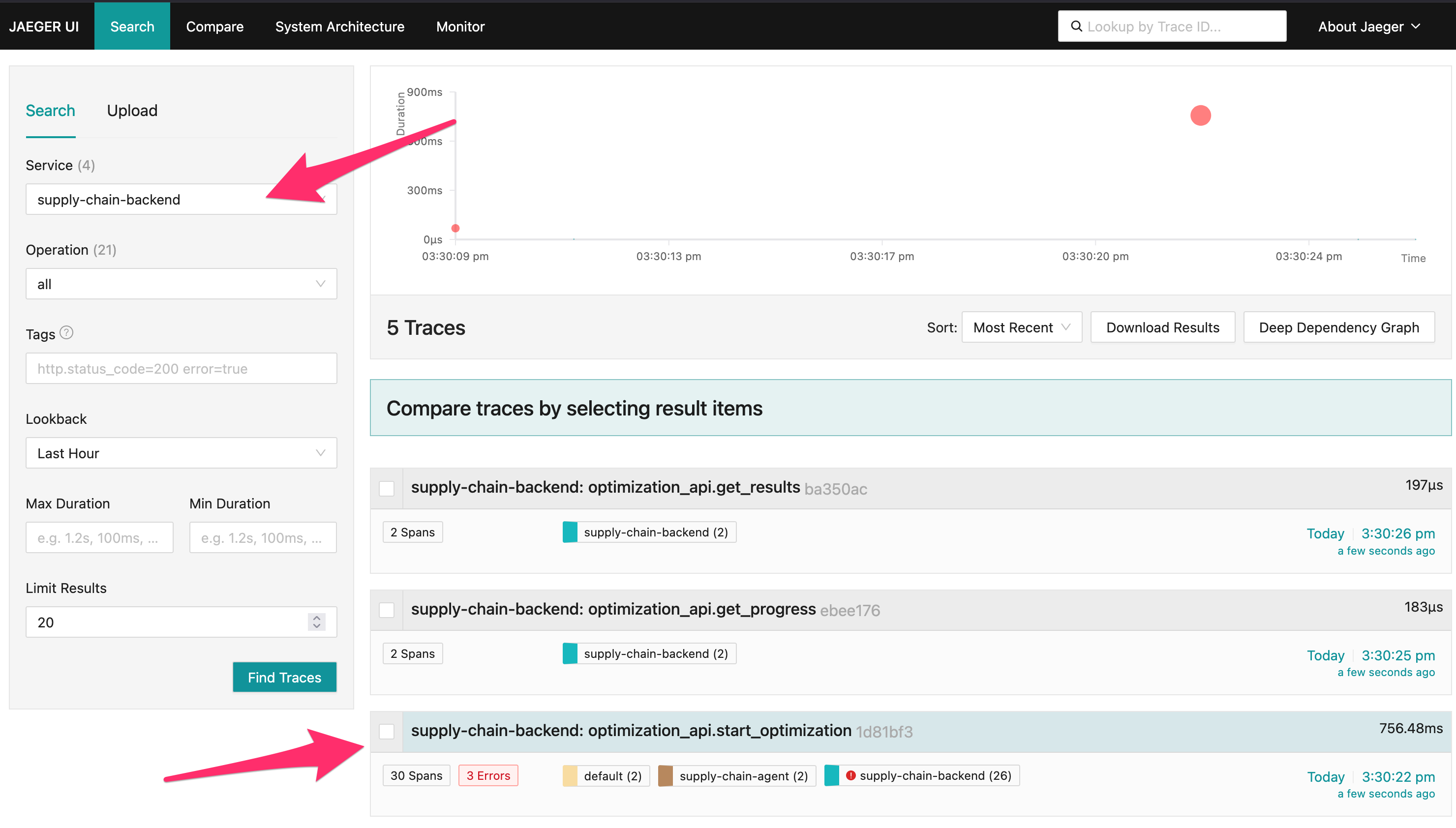
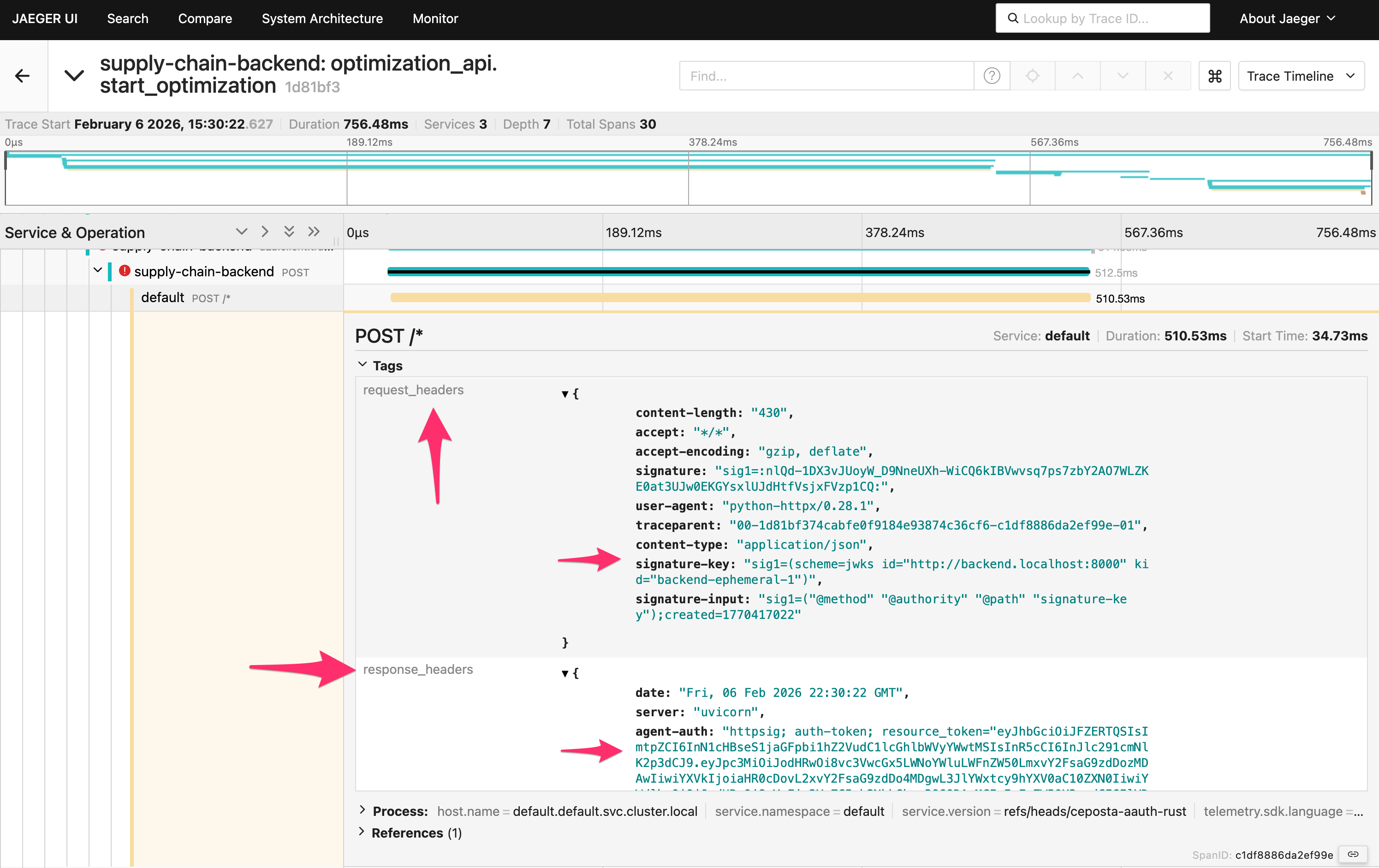
If you click a traceoptimization_api.start_optimization you’ll see the full flow. This will show the first call from backend to supply-chain-agent that fails, and how the supply-chain-agent responds.
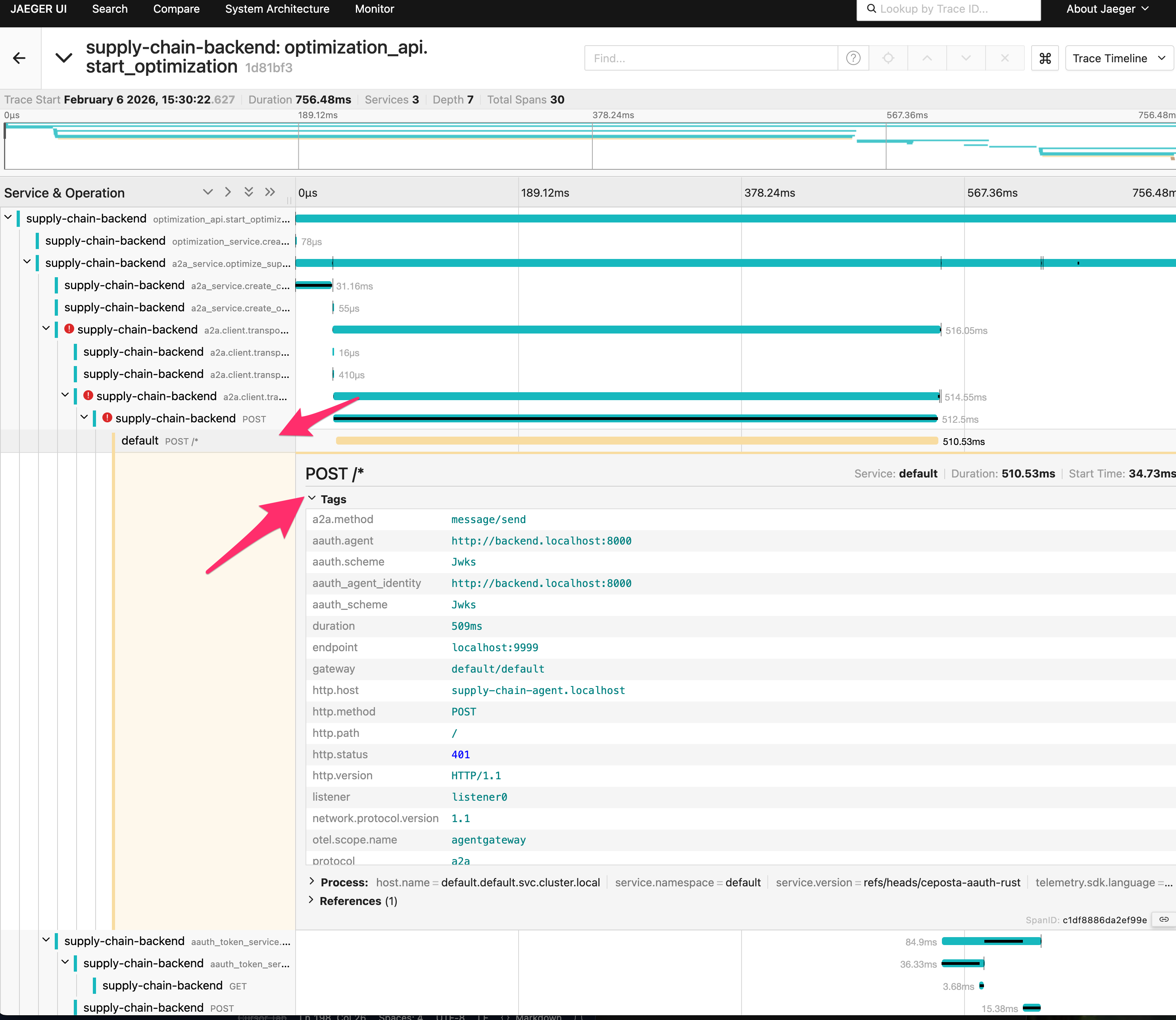
But if you look closer at the request (scroll down to see headers), you’ll see that the request was signed with JWKS and that the supply-chain-agent responded with a Resource token.
If you scroll farther down, you’ll see the call eventually succeeds with a valid JWT authorization token.
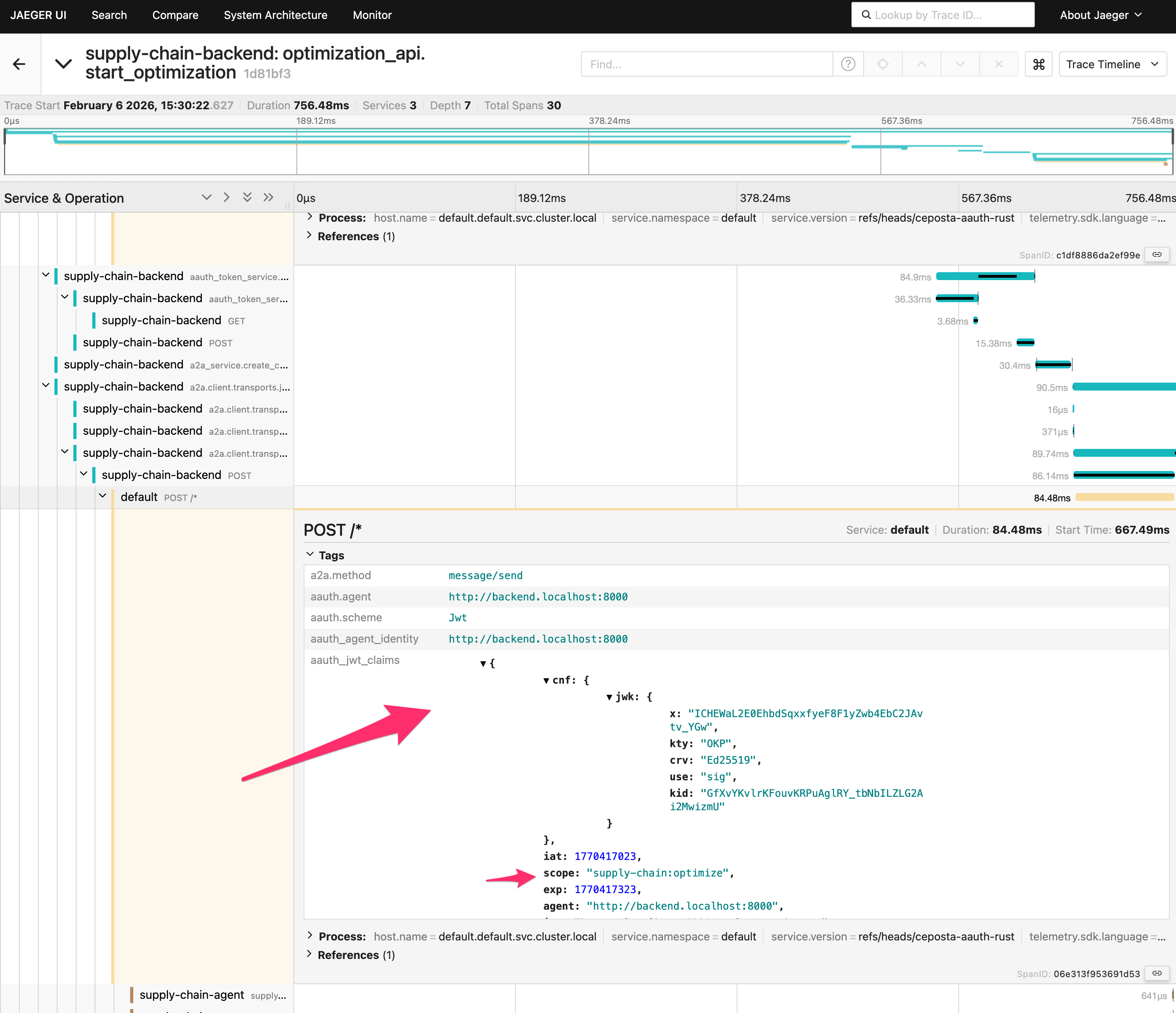
Key: Supply-Chain Agent challenges with resource_token → Backend exchanges it at the Person Server for aa-auth+jwt → Retry succeeds with JWT authorization.
Next: Agent Authorization with User Consent → - where the user gets prompted by the PS to consent for the aa-auth+jwt token.