Agent Authorization (with User Consent)
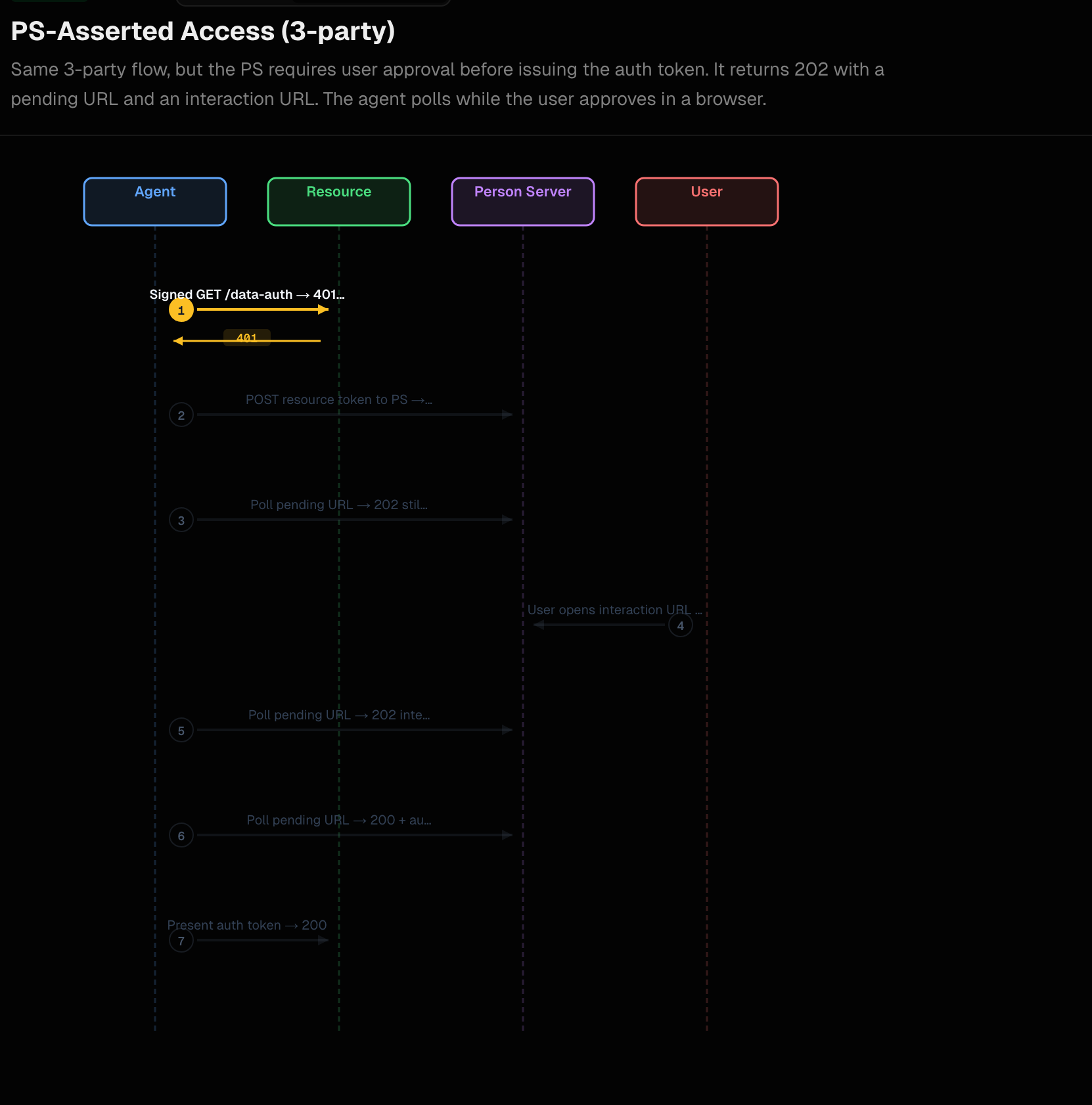
In this demo, we extend the autonomous PS-asserted authorization flow by adding the one piece the agent cannot satisfy on its own: explicit, on-the-fly user consent. This is the same PS-Asserted (Three-Party) flow (AAuth spec §4.1.3) we saw in the previous demo: the resource still issues a 401 challenge with an aa-resource+jwt, the backend still posts it to the Person Server’s token endpoint but the PS now refuses to issue the aa-auth+jwt until the user has approved the request through the interaction endpoint (spec §7.2 / §12.3.3).
When the PS decides consent is needed, it does not return an auth_token on the first signed POST /token. Instead it returns a deferred response (spec §12.4):
202 AcceptedLocationheader pointing at a pending URL the agent will pollAAuth-Requirement: requirement=interaction; url="…"; code="…"carrying the user-facing interaction endpoint and a single-use codeRetry-AfterandCache-Control: no-store
The backend surfaces the (url, code) pair to the UI so the user can complete consent in their browser, while the backend itself polls the pending URL with signed GET requests (per spec §12.4.3) until the PS responds with 200 OK and an auth_token. There is no separate authorization code grant — the pending URL and polling carry that role (spec Appendix B.2.4).
Run the components
To run this demo, please set up the prerequisites.
This flow uses the same Mode 3 / three-party PS-asserted setup as the autonomous demo. The only differences are:
- The aauth extauthz config tells
supply-chain-agentto mint resource tokens that include therequire:userscope. This is the signal the Person Server uses to decide it must run the consent interaction before issuing anaa-auth+jwt. - Restart the AAuth extauthz service with
aauth-config-user-consent.yamlinstead of the autonomous-flowaauth-config-mode3.yaml:
cd aauth-full-demo/agentgateway
AAUTH_CONFIG=aauth-config-user-consent.yaml "$HOME/bin/extauth-aauth-resource/aauth-service"
The agentgateway stays running the config-policy.yaml as in the previous step:
agentgateway -f ./agentgateway/config-policy.yaml
The aauth-config-user-consent.yaml resource section adds the consent trigger to the existing Mode 3 config:
supported_scopes:
  - supply-chain:check
  - supply-chain:read
  - supply-chain:optimize
  - require:user
scope_descriptions:
  supply-chain:check: Check supply chain
  supply-chain:read: Read supply chain
  supply-chain:optimize: Optimize supply chain
  require:user: Require user consent
default_resource_token_scopes:
  - supply-chain:check
  - supply-chain:read
  - require:user           # <-- this is what triggers PS consent
access:
  require: auth-token
person_server:
  issuer: http://127.0.0.1:8765
  jwks_uri: http://127.0.0.1:8765/.well-known/jwks.json
allowed_signature_key_schemes:
  - jwt
allowed_jwt_types:
  - aa-agent+jwt
  - aa-auth+jwt
policy:
  name: default
If you don’t have the other services running from the previous step, start each one:
| Component | Port | Command |
|---|---|---|
| UI | 3050 | cd supply-chain-ui && npm start |
| Backend | 8000 | cd backend && uv run . |
| Supply-chain-agent | 9999 | cd supply-chain-agent && uv run . |
| Market-analysis-agent | 9998 | cd market-analysis-agent && uv run . |
Step By Step
1. Initial Request Fails (401)
When the backend calls the supply-chain-agent, the resource (via the aauth-service extauthz at the gateway) sees that access: require: auth-token is configured but the request only carries an aa-agent+jwt. It responds with a 401 and an AAuth-Requirement header carrying the resource token — exactly the same first hop as the autonomous flow:
INFO:aauth_interceptor:🔐 AAuth: Signing with agent token (aa-agent+jwt in Signature-Key)
INFO:aauth.tokens:401 from supply-chain-agent: configure policy on agentgateway or fix signatures
INFO:aauth.tokens:401 AAuth / aauth | aauth-requirement: requirement=auth-token, resource-token="eyJ0eXAiOiJhYS1yZXNvdXJjZStqd3QiLCJhbGciOiJFZERTQSIsImtpZCI6InNwYS1yc2stMSJ9..."
The only difference from the autonomous resource token is the embedded scope — the resource token now contains require:user, which the PS will use as its consent trigger:
{
  "iss": "http://supply-chain-agent.localhost:3000",
  "dwk": "aauth-resource.json",
  "aud": "http://127.0.0.1:8765",
  "agent": "aauth:b8ef15f9-725a-4e87-a0da-14a8edcf9009@agent-server.example",
  "agent_jkt": "k7PlM2ZaFNvm7p_2NPqZpW3DCmgRHqYfB3zi9WJpdbo",
  "iat": 1778720443,
  "exp": 1778720743,
  "scope": "supply-chain:check supply-chain:read require:user",
  "jti": "98a1709f-c169-4393-a93a-030e5b75d291"
}
2. Person Server returns 202 (interaction required)
The backend extracts the resource token, signs a POST to the PS’s token_endpoint with its aa-agent+jwt in the Signature-Key header (and typically Prefer: wait=N so the PS may long-poll the request — spec §12.4.1):
POST /token HTTP/1.1
Host: 127.0.0.1:8765
Content-Type: application/json
Prefer: wait=45
Signature-Input: sig=("@method" "@authority" "@path" "signature-key");created=…
Signature: sig=:…:
Signature-Key: sig=jwt;jwt="eyJhbGc…"

{"resource_token": "eyJ0eXAi…"}
The PS verifies the agent token and the resource token, sees require:user in the resource scope, and — instead of issuing an aa-auth+jwt — returns a deferred response (spec §7.1.4 / §12.3.3 / §12.4.2). At the wire level, the spec-mandated shape is just this:
HTTP/1.1 202 Accepted
Location: http://127.0.0.1:8765/pending/2e44214dc421
Retry-After: 0
Cache-Control: no-store
AAuth-Requirement: requirement=interaction; url="http://127.0.0.1:8765/ui/consent.html"; code="EoBYdOdwCCLniFkJ1SSJSQ"
Content-Type: application/json

{"status": "pending"}
Per spec §12.4.2 the only REQUIRED body field is status ("pending" while waiting, "interacting" once the user has arrived). The headers do all the normative work: Location (REQUIRED — pending URL to poll), Retry-After (REQUIRED — polling cadence in seconds, 0 means “retry immediately”), Cache-Control: no-store (REQUIRED), and AAuth-Requirement (OPTIONAL in general, present here because the PS needs the user). The interaction url and code are normatively conveyed only in the AAuth-Requirement header per spec §12.3.3 / §7.2 — not in the body.
Two things are happening in this single response:
- For the user:
AAuth-Requirement: requirement=interaction; url=…; code=…says “to make progress, send a human to{url}?code={code}” (spec §7.2). Thecodeis single-use and ties the human’s browser session to this exact pending request. - For the agent:
LocationandRetry-Aftersay “poll this URL with signedGETrequests until I have a terminal answer” (spec §12.4.3).
The Person Server in this demo emits a richer body than the spec minimum — it duplicates the requirement/code data and adds a few internal IDs:
{
  "status": "pending",
  "requirement": "interaction",
  "code": "EoBYdOdwCCLniFkJ1SSJSQ",
  "interaction_url": "http://127.0.0.1:8765/ui/consent.html",
  "retry_after": 0,
  "pending_id": "2e44214dc421",
  "pending_url": "http://127.0.0.1:8765/pending/2e44214dc421"
}
These extra fields are non-normative — the spec does not define them for requirement=interaction (the only spec-defined extra body fields are clarification/timeout/options for requirement=clarification and required_claims for requirement=claims, per §12.4.2). They’re a convenience: the AAuth Python client (aauth.agent.poller) reads requirement and code from the body in addition to the header, so duplicating them keeps the implementation tolerant to clients that only inspect one or the other. A spec-compliant client only needs the headers.
The backend’s exchange_resource_token helper (from the aauth Python library) handles both sides automatically. It hands the (interaction_url, code) pair to its on_interaction callback, which the demo backend uses to surface consent state to the UI:
INFO:app.services.a2a_service:PS requires user interaction — url=http://127.0.0.1:8765/ui/consent.html?code=EoBYdOdwCCLniFkJ1SSJSQ&callback=http://localhost:3050/auth-callback?request_id=d4ae0c8f-ff5e-41e8-95b4-c6e6f52dcac6 code=EoBYdOdwCCLniFkJ1SSJSQ
INFO:aauth.tokens:USER INTERACTION REQUIRED: visit http://127.0.0.1:8765/ui/consent.html?code=EoBYdOdwCCLniFkJ1SSJSQ&callback=http://localhost:3050/auth-callback?request_id=d4ae0c8f-ff5e-41e8-95b4-c6e6f52dcac6 (code: EoBYdOdwCCLniFkJ1SSJSQ)
The demo backend appends &callback={frontend_callback} to the interaction URL — spec §7.2 allows agents that have a browser to opt in to a server-driven redirect back to the app once consent is complete (so the popup can close itself instead of relying solely on polling).
While the user is being directed to the consent screen, aauth.agent.poller is calling GET on the pending URL on a loop. Each poll is signed with the agent’s ephemeral key and carries the aa-agent+jwt (per spec §12.4.3 — Prefer: wait MAY be sent). The PS keeps replying 202 with {"status": "pending"} (or "interacting" once the user has arrived at the interaction endpoint) until the user makes a decision. A non-202 response is terminal: 200 OK carries the auth_token, 403 means denied/abandoned, 408 means the pending request timed out, 410 means the code was already consumed (spec §12.4.4 state machine).
3. User Consent Screen
The interaction URL the backend surfaced in step 2 is what the UI opens for the user. The user lands on the Person Server’s consent page (the interaction_endpoint published in /.well-known/aauth-person.json, with the code from the AAuth-Requirement header pre-filling the session):
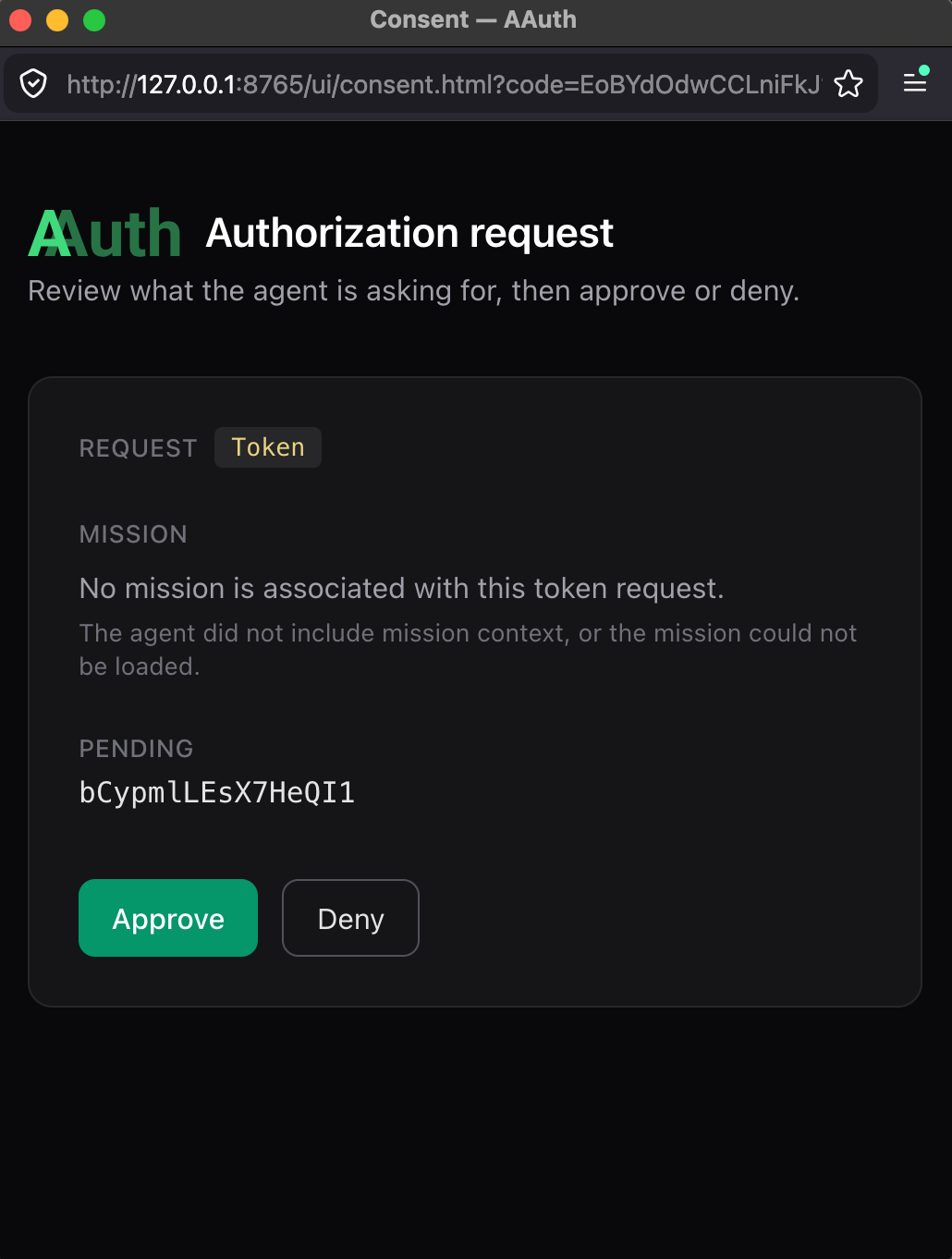
The user sees:
- Which agent is requesting access (the
backend— derived from the verifiedaa-agent+jwtand resolved through the agent’s PS registration) - What scopes are being requested (
supply-chain:check supply-chain:read require:user, from the resource token) - The ability to approve or deny
This consent UI is the Person Server’s own. There is no separate identity provider involved — in this demo the PS plays both the AAuth Agent Provider role and the Person Server role (spec §4.2 “Common collocations”), and the user authenticates directly to the PS portal (http://127.0.0.1:8765/ui). The browser leg and the agent’s polling leg are decoupled: both converge through the pending_id the PS minted in step 2.
4. Auth token with user-asserted claims
Once the user approves, the next poll the backend makes returns 200 OK with the auth_token payload. The backend now retries the original call to supply-chain-agent, this time presenting the aa-auth+jwt in the Signature-Key header (scheme=jwt). The supply-chain-agent’s extauthz logs:
INFO:agent_executor:🔐 Auth token detected in request (scheme=jwt)
INFO:httpx:HTTP Request: GET http://127.0.0.1:8765/.well-known/jwks.json "HTTP/1.1 200 OK"
INFO:agent_executor:✅ Auth token verified successfully
INFO:agent_executor:✅ Authorization successful: auth_token verified for agent: aauth:b8ef15f9-725a-4e87-a0da-14a8edcf9009@agent-server.example
Decoded, the aa-auth+jwt (spec §9.4.1) looks like this:
{
  "iss": "http://127.0.0.1:8765",
  "aud": "http://supply-chain-agent.localhost:3000",
  "dwk": "aauth-person.json",
  "jti": "b574b8a5-e2db-4586-9d96-4e9c05b15d51",
  "agent": "aauth:b8ef15f9-725a-4e87-a0da-14a8edcf9009@agent-server.example",
  "cnf": {
    "jwk": {
      "kty": "OKP",
      "crv": "Ed25519",
      "x": "9Z0ySzZ7xYhcSv8LE9DYETLPoQeLn0q3hHIqif8v4MU"
    }
  },
  "act": {
    "sub": "aauth:b8ef15f9-725a-4e87-a0da-14a8edcf9009@agent-server.example"
  },
  "iat": 1778718323,
  "exp": 1778721923,
  "sub": "user",
  "scope": "supply-chain:check supply-chain:read require:user"
}
The key parts (spec §9.4.1):
iss— the Person Server that issued this auth token. Same entity that issued everyaa-agent+jwtin this demo (PS + AP collocation, spec §4.2).dwk: aauth-person.json— tells the resource which well-known document to fetch to discover the issuer’s JWKS (spec §9.4.3 step 2). PS-asserted auth tokens useaauth-person.json; AS-issued tokens useaauth-access.json.aud— scoped to thesupply-chain-agent. Useless anywhere else.agent— the verified caller identity (aauth:local@domainform, spec §5.1). Matches theagentclaim from the resource token.cnf.jwk— bound to the backend’s current ephemeral public key (proof-of-possession, spec §14.1). Only the backend can use this token because only it holds the matching private key.act.sub— the actor; the entity that requested the auth token (spec §9.4.1, [RFC 8693] §4.1). In direct authorization this is the agent itself; in call chainingactwould nest the upstream agent’s identity (spec §10.1).sub— the user identity asserted by the PS. In this demo the PS issues"user"as a single-tenant placeholder; in a multi-user PS the spec recommends a pairwise pseudonymous identifier peraudso different resources see differentsubvalues for the same person (spec §9.4.1 / §15.1).scope— the scopes the PS confirmed the user consented to (carried over from the resource token, withrequire:userpropagated through).
What materially changed compared to the autonomous flow is how this token came into existence: the user explicitly clicked “Approve” through the Person Server’s interaction endpoint before the PS would mint it. The token’s wire format is the same; the PS’s evaluation in front of issuance is what differs.
Compare to Autonomous Scheme
Both flows produce a PS-issued aa-auth+jwt with the same claim shape (spec §9.4.1). The difference is what the PS does before signing:
| Aspect | Autonomous (aauth-config-mode3.yaml) | User Consent (aauth-config-user-consent.yaml) |
|---|---|---|
Resource scope contains require:user | ❌ No | ✅ Yes |
PS reaction to POST /token | 200 immediately, returns auth_token | 202, returns pending URL + interaction URL/code |
| User involvement | None — PS auto-issues based on prior agent registration | Explicit click-to-approve on the PS interaction page |
| Polling required by agent | ❌ No | ✅ Yes — signed GET on the pending URL until terminal status |
auth_token claim shape | iss, aud, agent, cnf, act, sub, scope, dwk: aauth-person.json | Identical |
sub semantics | PS-asserted user (always-on owner of the agent registration) | PS-asserted user and explicit per-request consent |
| Spec section | §4.1.3, §7.1.4 (Direct grant) | §4.1.3, §7.1.4 (Deferred), §7.2, §12.3.3, §12.4 |
This is what the spec calls out in §4.3: “Person Server decides whether to issue an auth token for a given resource and scope — based on user consent and, when the agent is operating under a mission, the mission’s intent and prior log entries against the PS’s governance policy.” Same decision point — different signal (require:user) flips it from quiet approval to interactive approval.
How This Relates to OIDC
If you’re coming from OAuth 2.0 / OIDC, the moving parts map cleanly:
- OIDC authorization code flow with
prompt=consent↔ AAuth’s PS deferred response withrequirement=interaction(spec §12.3.3). Both park the request server-side, send the user to a consent page, then resume. - OIDC
codeparameter on the redirect URI ↔ AAuth’scodeparameter on{url}?code={code}(spec §7.2). Same idea: a single-use, opaque value that ties the browser back to the pending server-side request. The big difference is that AAuth’scodeis not redeemed for a token — there’s no/tokenround trip withgrant_type=authorization_code. The polling on the pending URL plays that role (spec Appendix B.2.4 “Why No Authorization Code”). - OIDC ID token
sub↔aa-auth+jwtsub. Both identify the human who consented. The spec recommends pairwise pseudonymous identifiers per audience (spec §9.4.1, §15.1) — analogous to OIDC pairwise subject identifiers ([OpenID.Core] §8.1). - OAuth
scope↔ AAuthscope(spec §12.2 reuses OpenID Connect scope vocabulary). - DPoP / mTLS-bound tokens ↔ AAuth
cnf.jwkproof-of-possession (spec §14.1) — every token in AAuth is sender-constrained to the agent’s signing key by construction.
The key innovation AAuth adds on top of OIDC is dual identity: the same token carries both who the user is (sub) and which agent is acting on their behalf (agent + cnf.jwk + act). Traditional OAuth tokens represent either the user or the application. AAuth tokens represent the user and the specific agent instance simultaneously, with a verifiable actor chain. That makes audit statements like “the agent identified by aauth:b8ef15f9-…@agent-server.example, holding key 9Z0ySzZ…, was authorized by user 00b519e8-… via the Person Server http://127.0.0.1:8765 to call supply-chain-agent with scope supply-chain:optimize” express both the identity and the consent in a single, signed credential.
Summary
Use autonomous mode when the agent acts on its own standing authority — background jobs, system-to-system coordination, or anywhere the user has effectively pre-approved the agent’s class of work at registration time. The PS issues immediately.
Use user consent mode when the user must be in the loop for this specific request — accessing user data, taking actions with user accountability, or satisfying a regulatory consent requirement. The resource signals this need by including require:user in the resource token scope; the PS responds with a deferred response that pauses issuance behind explicit user approval.
What the Tokens Prove
After consent is approved, the backend’s pending-URL poll returns 200 with an auth_token whose sub claim asserts the user identity the PS is configured to issue ("user" in this demo’s default configuration; a real deployment would use a pairwise pseudonymous subject per spec §9.4.1 / §15.1). The presence of sub together with agent + cnf.jwk + act.sub is what distinguishes a PS-asserted, user-consented token from anything that could have been issued by an unauthenticated client — the resource can prove who approved (the user, via their PS), which agent is using it (the agent URI, bound by cnf.jwk), and what was approved (scope).
In the next post, we’ll explore how Agentgateway uses these claims to enforce policy: Apply policy with Agentgateway →.