Not All Agent Sandboxes Are Created Equally
Discobox, OpenShell, E2B, SPACE, Agent Substrate, and other agent sandboxes make very different assumptions. This post introduces four axes for comparing them, boundary and access controls, environment, lifecycle, and interface and experience.
This post was originally published on the kagent blog.
Where are you running AI agents? Laptops? Some provider? Kubernetes? All the above? Organizations are adopting AI agents and need somewhere to run them, and there’s a growing number of “sandbox” projects popping up to meet that need. I have been digging into the challenges of running AI agents at scale with our customers and I’ve run into some interesting projects, just like you may have. Discobox, OpenShell, Minimal, E2B, Perplexity’s SPACE, Agent Substrate, Docker Sandboxes (and others). I’ve been digging into these projects over the last couple of weeks, and they make quite different assumptions which drive their internal architecture, implementation, and audience.
So which sandbox should you use? That’s a bit like asking “what’s the best car?” You have to tell me more about what you’re trying to do. I think there are four axes that help you wrap you head around these projects.
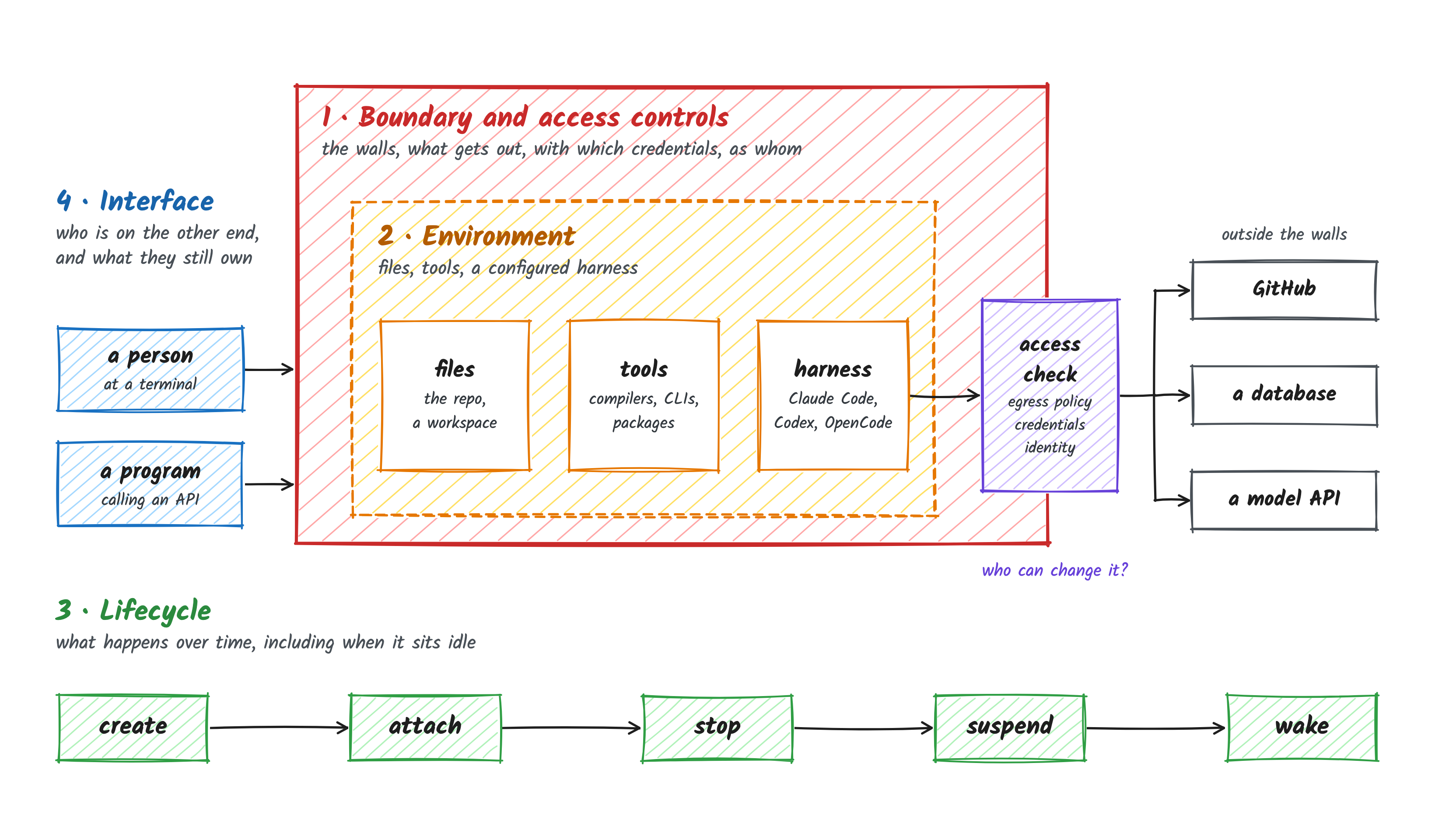
- Boundary and access controls. What contains the workload, what can it reach, and who controls that access?
- Environment. What files, tools, dependencies, and agent configuration does it run with?
- Lifecycle. How does it start, wait, stop, and recover?
- Interface and experience. Who uses it, through which interfaces, and how much work does the caller own?
In this series, I’ll take each project through these four axes, explain its design choices, and look at its strengths, its weaknesses, and where these projects could compose with each other (or where they could converge).
If you feel I have missed some projects, please let me know!
Do we need sandboxes?
So why do we need a sandbox for an agent at all? An agent runs code that a model decided to run (shell commands, scripts, package installs, etc), and what it decides depends on whatever it reads along the way, including a GitHub issue, a README, or a tool response that someone wrote to steer it. Even without anything malicious, it can rm -rf the wrong directory, force-push over someone’s branch, or loop until it eats your token budget.
The model can also invent an upload URL or choose a command that has nothing to do with the task, and the tools can turn that mistake into a real network request. The behavior reported by Cohere is a useful example, even without settling what caused it. We don’t have to establish malicious intent to want that request blocked. Whether the model is confused, following an injected instruction, or convinced it’s running a useful test, I want the environment to enforce what it’s allowed to do independently of the model’s explanation.
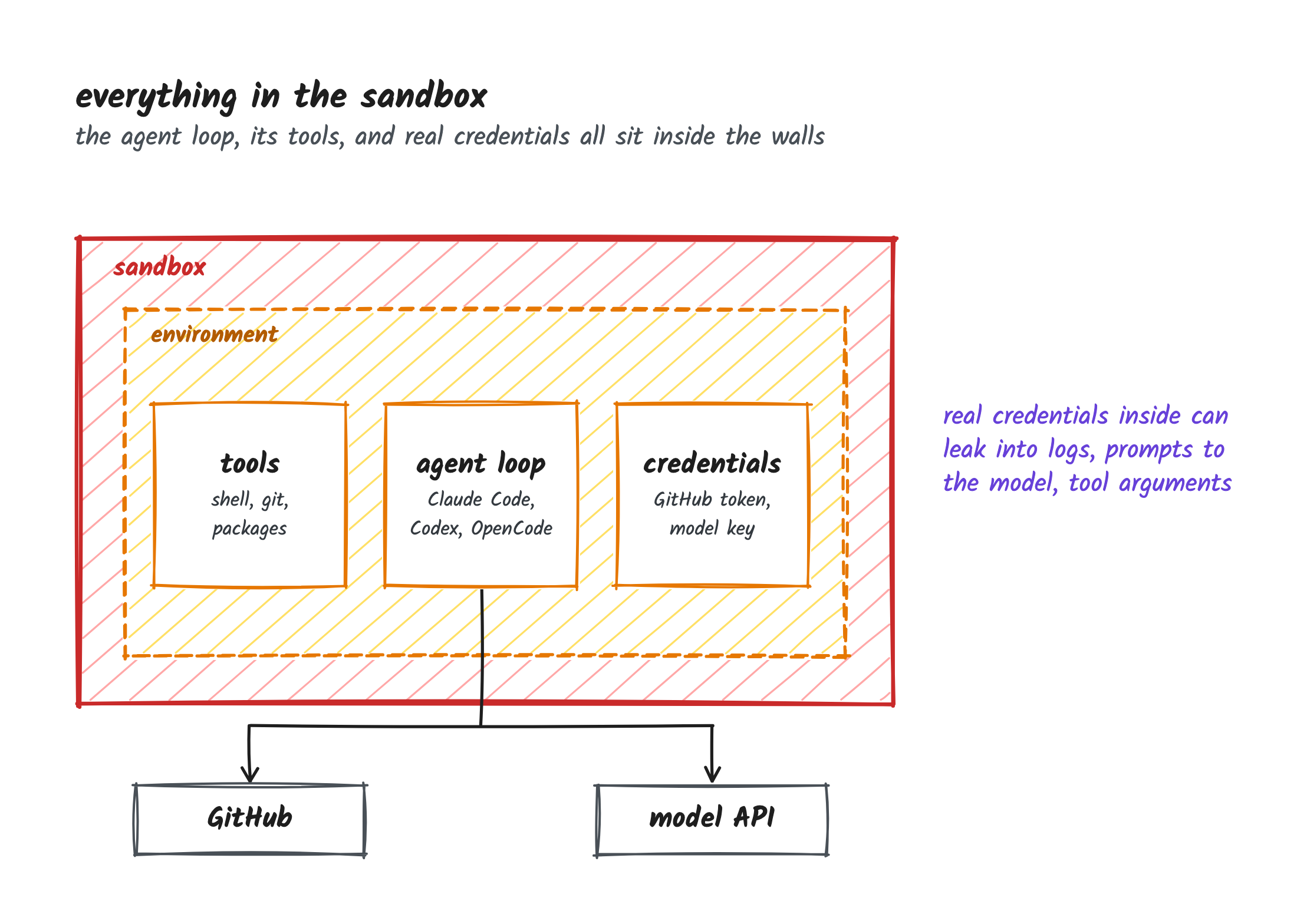
Today most people run agents on their laptop, with a human approving steps along the way. Approval is one gate, but the laptop itself is not great: the agent runs with everything the developer has access to, e.g. SSH keys, cloud credentials, .env files, a GitHub token, the corporate network, etc. And any credential the agent can read can also leak without anyone meaning to (see recent LiteLLM compromise), e.g. printed into a log, pulled into the context it sends to the model provider, or passed along as a command-line argument or URL parameter. You can (maybe) get away with that while a person is watching each step. But what we tending toward agents that run unattended, for a long time, several at once, and at that point we can’t hand them access to everything. Something else has to contain what the agent can break, limit what it can reach and with which credentials, and let us review what it did before it lands anywhere that matters.
Sandbox usecases
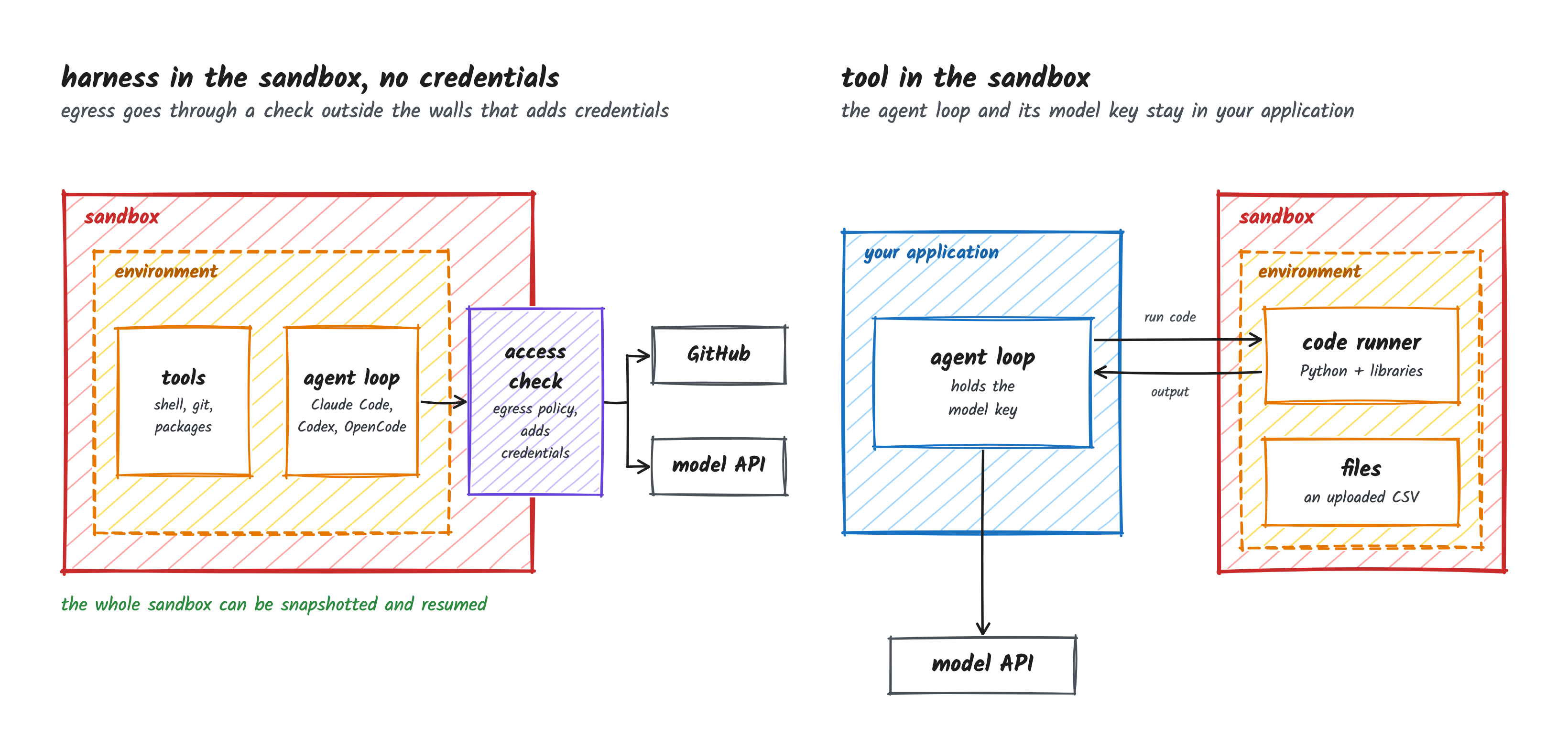
There are also two pretty clear ways to use a sandbox. The first is to put the whole agent in there (the harness, its tools, the repo) and lock it down, which is what you’d do with Claude Code or Codex working on a repository. The second is to keep the agent loop in your own application and only send the code or tool calls it wants to run into the sandbox, e.g. a chat app where the model writes some Python to analyze an uploaded spreadsheet, and the app runs it in a sandbox and hands the result back to the model. You can also mix the two, e.g. the harness runs in one locked-down sandbox and spins up separate, short-lived sandboxes for the code or tools it doesn’t want running next to itself.
Boundary and access controls
When people talk about sandboxes, they usually start with the isolation tech. Is it a restricted process on the host, a container, gVisor, or a microVM with its own kernel? Each of those makes an escape harder but none of them make it impossible. The question I’d ask first though is whether the boundary is even meant to hold against the agent. A privileged container running as root isn’t much of a boundary against what’s inside it, and some projects choose that on purpose because the agent needs things like Docker and systemd inside the sandbox. That’s a reasonable trade for an agent you trust, but not great for one you don’t.
But an agent doesn’t need to break out of anything to do damage. If it can reach GitHub or a database with a valid credential, it can force-push over someone’s branch or drop a table from inside a perfectly good microVM. An invented upload URL can also receive a request if outbound traffic is unrestricted. So the other half of this axis is access, ie, what the agent can reach on the network, which credentials it can use, and who gets to change those rules. And keeping the token out of the sandbox (having a proxy attach it on the way out) doesn’t change what the token is allowed to do, so the agent can still do anything it’s scoped for through that proxy.
For each project I want to know which component enforces these controls, whether it sits outside the sandbox where the agent can’t touch it, and who is allowed to change it. OpenShell runs a supervisor outside the workload that checks outbound requests against policy and attaches credentials. Agent Substrate denies egress by default and swaps in credentials at a shared gateway. E2B’s open-source runtime allows public egress by default and puts credentials inside the sandbox (its hosted product does more).
Environment
Once the agent is running, what does it actually have to work with? For a coding agent probably a repository, build tools, dependencies, and the harness itself (Claude Code, Codex, OpenCode, etc). For an application that spins up a sandbox to run model-generated code (e.g. running that spreadsheet analysis on E2B), it might be just a Python runtime and a few libraries. Either way, somebody has to decide what goes in there and keep it up to date.
So who prepares it? It could be a developer, a platform team maintaining a set of golden images, or the agent itself installing whatever it needs as it goes (pip install, apt-get, npm install, etc). If the agent installs its own dependencies, it needs egress to PyPI, npm, and wherever else it decides to pull from. And an agent that needs Docker or systemd inside the sandbox is how you end up with privileged containers. So the environment you want has a direct effect on the boundary you can have. The projects take pretty different approaches here, e.g. E2B builds templates from a Dockerfile, OpenShell runs whatever image you hand it, and Minimal assembles the tools from its own package registry.
Then there’s how work gets in and back out. If you mount a directory from your laptop, the agent is editing your real files. If it works on its own checkout, it commits there and you decide what comes back (Discobox does this with discobox apply), and an API sandbox usually gives you a file API to upload inputs and download results. The agent’s own configuration (which model, which gateway, which provider settings) has to live somewhere too. Does it belong to the harness, the project, or each sandbox? For a platform team that’s the difference between maintaining it in one place or in every repo.
Lifecycle
AI agents are different from microservice style applications because they have intermittent periods of inactivity. They could be waiting for an event, human interaction, or even approval. Some of the sandbox projects take this into account by giving you a way to “pause” or “stop” the agent while it’s idle, so it isn’t holding CPU and memory the whole time it waits.
But what does “stop” mean? It might mean keeping the files and starting a new process later, or it might mean saving the filesystem and live memory so an existing process picks up where it left off when the sandbox resumes. An agent framework might also rebuild the conversation from a database, in which case the agent remembers what it was doing, but the shell it was using, the build it was running, and its open connections are gone, so it has to redo that work.
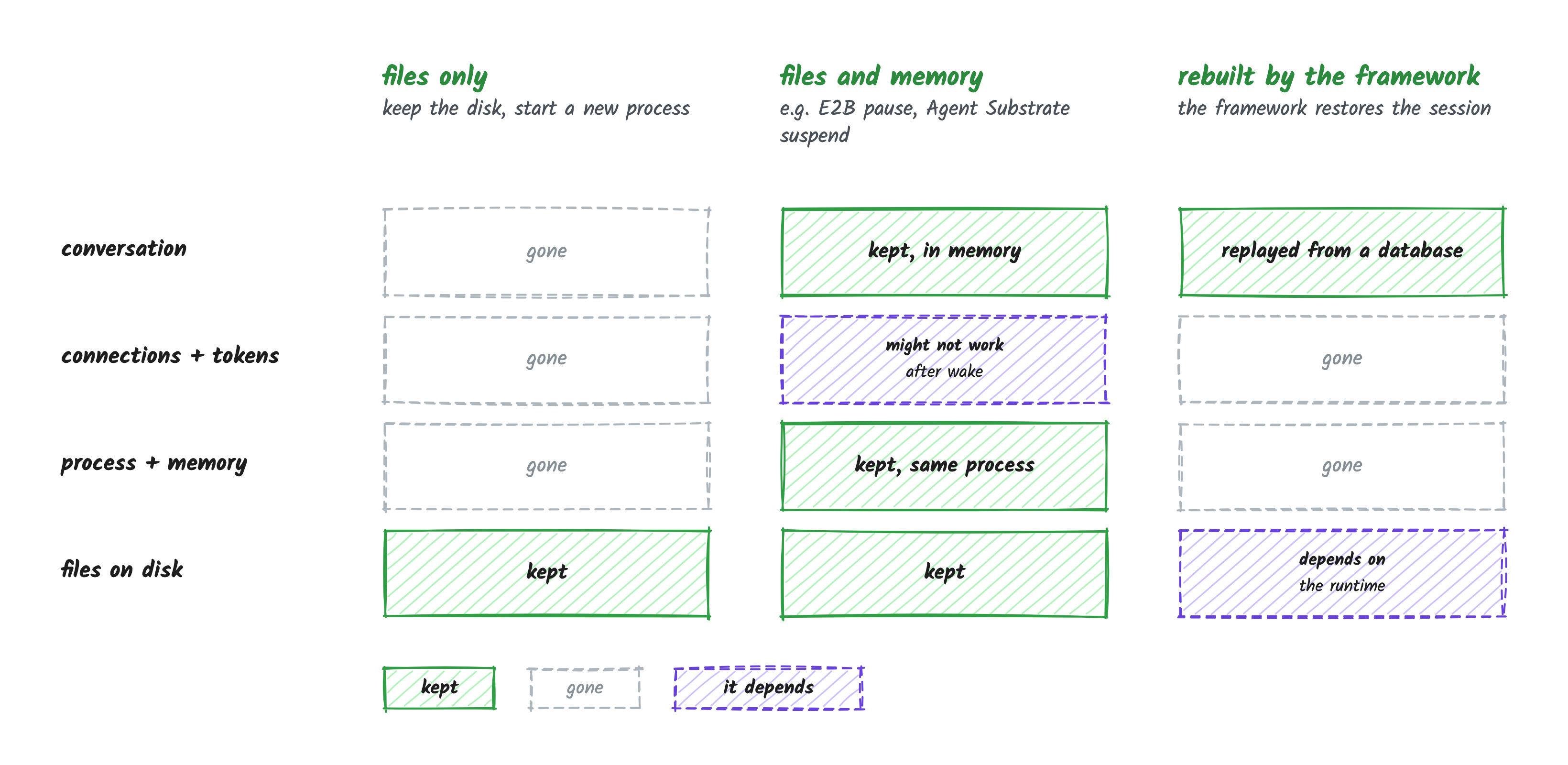
Whether the agent runs inside the sandbox matters here too. If the whole agent is in the sandbox, a snapshot with memory captures the agent and its conversation along with everything else. If the loop lives in your application, the conversation is already safe there and the sandbox can often be thrown away after each call. E2B can pause a sandbox with both its filesystem and memory. Agent Substrate assumes most agents sit idle most of the time, so it suspends them with their memory and wakes them when a request comes in, or snapshots just the files and starts the processes fresh, depending on what the framework or application on top asks for.
And who decides when to suspend? It could be a timer, a framework that knows the task is waiting on a human, or an operator doing it by hand. Whatever it is, something also has to wake the agent up again and restore its state on a machine with room for it. A snapshot also only covers what happened up to the moment it was taken, so a host crash loses everything since then.
Interface and experience
Since the various sandbox technologies are slightly different, you have to dig into who the primary user audience is. Sometimes it’s a developer at a terminal, sometimes it’s a program calling an API or SDK, and in an enterprise there’s usually a platform team behind both of them deciding which images, policies, credentials, and agent configuration everyone gets (and who is allowed to create or attach to whose sandbox). The interface type (CLI, UI, API, SDK, MCP, etc) matters less than which of those callers it was built for and how much work it leaves them. A developer wants to start an agent and get back to what they were doing, and a platform team wants to set things up once instead of chasing every repo.
The difference between running the agent in the sandbox and keeping it in your application shows up pretty clearly here. With the agent in the sandbox, a developer starts it on a repository (or developer task), attaches while it works, looks at the diff, and applies the changes (Discobox is built around this flow). With the loop in an application, the program creates a sandbox, uploads the spreadsheet, runs the Python the model wrote, and pulls the result back, all through an API like SPACE’s or Substrate env’s.
And what happens when the caller goes away? Say a developer closes their laptop in the middle of a long build, or the application’s connection drops while a command is still running. Is the work still going when they come back, and can they get the output that was written while nobody was listening? If the product doesn’t handle that, the caller ends up building retries, cleanup, and somewhere to keep results, and that can turn into a big chunk of the application.
What’s coming in this series
Here’s what I’ll cover, one post per project.
- Discobox: development environments for coding agents, where each agent works in its own box on a copy of your repo.
- Minimal: runs coding agents in sandboxed sessions built from its own package registry.
- Docker Sandboxes: Docker’s tool for running coding agents on your machine in microVMs, each with its own Docker daemon.
- DefenseClaw: Cisco’s governance layer that runs coding agents in OpenShell sandboxes.
- OpenShell: NVIDIA’s sandbox runtime that puts policy, egress, and credential controls around an agent.
- nono: a single binary that wraps an agent process on your machine with kernel restrictions and an optional egress proxy.
- E2B: an API and SDK for creating short-lived microVM sandboxes.
- SPACE: Perplexity’s API-first microVM sandbox platform.
- Substrate env: a shell, file, and MCP API for sandboxes running on Agent Substrate.
- Agent Substrate: Kubernetes infrastructure for running, suspending, and waking lots of mostly idle agent workloads.
- Google AX: a task runner for agents built on Agent Substrate.
- kagent: a Kubernetes-native framework for building and running agents.
Some of these build on each other. DefenseClaw uses OpenShell as its sandbox runtime, and Substrate env, AX, and the kagent architecture I’m looking at all run on Agent Substrate, so in each post I’ll call out which layer actually owns a behavior. Each follow-up post takes one project through all four axes, and I’ll say which release (and for hosted products, which edition) it covers.
So what should you do?
So which sandbox should you use? Like I said at the start, that’s a lot like asking what the best car is. A coding agent working on one repository is going to land you somewhere very different from an application spinning up thousands of short-lived sandboxes to run model-generated code, and most of that difference comes from where the agent loop runs. So start there, then work through the rest.
Before choosing a sandbox, understand where the agent loop runs, what the agent must be prevented from doing, what environment it needs, what state must survive, and who will be calling it. Then check which component in each project actually provides those things, and who has to operate it.
If you disagree, or think I’ve missed a project or a question, I would love to know! Find me on LinkedIn.